Installing and moving
Installation with Docker
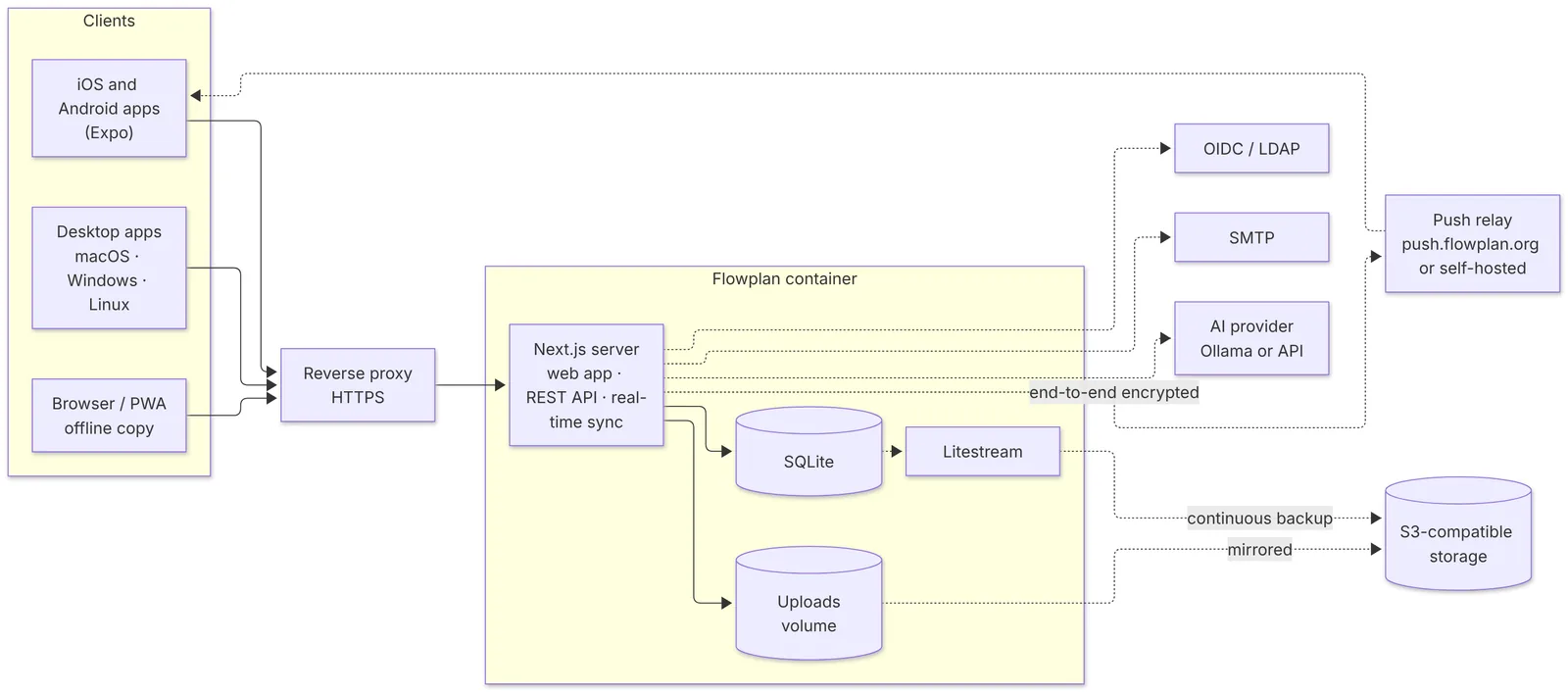
Flowplan runs as a single container with SQLite and a data directory. Postgres, Redis or a separate search service are not needed – PostgreSQL and several instances are possible, but optional.
9 min read
On this page
More on this topic: Deploy in one click
Requirements
- A server with Docker and a persistent volume. Text recognition for scanned PDFs briefly needs noticeable CPU when uploading.
- Already running an instance on another server? Then move it after installing instead of starting over.
- A domain with HTTPS through a reverse proxy (Traefik, Caddy, nginx, Coolify, Pangolin …). For just trying it out it works without, see Without HTTPS.
- Optionally an OpenID Connect provider for single sign-on. Without one, people sign in with e-mail and password or a passkey, see Sign-in.
- Optionally an S3-compatible storage for files and the continuous database backup, see Storage, S3 and backups.
- Optionally a PostgreSQL database instead of SQLite, see PostgreSQL. How much hardware you need for how many people is under Sizing.
With Docker Compose
Flowplan is open source (AGPL-3.0). The ready-made image is in the GitHub Container Registry, for linux/amd64 and linux/arm64:
| Tag | Content |
|---|---|
ghcr.io/yannicschuller/flowplan:latest | The latest version (release) |
ghcr.io/yannicschuller/flowplan:0.7.0 | A fixed version (currently 0.7.0), also as :0.7 and :0 |
ghcr.io/yannicschuller/flowplan:beta | The latest manually built development state, or a release if that is newer – for trying out, not for production |
Download the Compose file and the example configuration:
mkdir flowplan && cd flowplan
curl -O https://raw.githubusercontent.com/yannicschuller/flowplan/main/compose.yaml
curl -o .env https://raw.githubusercontent.com/yannicschuller/flowplan/main/.env.example
In
.env, set at least the public address:APP_URL=https://flowplan.example.com # Recommended once the address is reachable from the internet: openssl rand -hex 24 FLOWPLAN_SETUP_TOKEN=With
FLOWPLAN_SETUP_TOKENyou create the first account viahttps://flowplan.example.com/register?setup=<token>; without the link a new instance offers neither sign-up nor restore. If the token is missing andAPP_URLis not a local address, Flowplan warns at start in the log and on the setup screen.For single sign-on also set
OIDC_ISSUER,OIDC_CLIENT_ID,OIDC_CLIENT_SECRETandOIDC_ADMIN_GROUP(see Sign-in); for e-mails (invitations, forgotten passwords) theSMTP_*values from the configuration.Start it:
docker compose up -d
The container listens on port 3000 (bound to 127.0.0.1 only in the Compose file, so that the proxy sits in front of it). The volume flowplan-data on /app/data holds all content independently of the container. Choose a fixed version with FLOWPLAN_VERSION=0.7.0 in .env.
An instance opens with the sign-in page. The website flowplan.org and this documentation are separate projects; the hosted instance runs at app.flowplan.org.
Build the image yourself
From the source code (github.com/yannicschuller/flowplan (opens in a new tab)):
git clone https://github.com/yannicschuller/flowplan.git && cd flowplan
cp .env.example .env
docker compose up -d --build
Or without Compose:
docker build -t flowplan:latest .
docker run -d --name flowplan \
  -p 127.0.0.1:3000:3000 \
  -v flowplan-data:/app/data \
  --env-file .env \
  flowplan:latest
Build arguments: PG_CLIENT_MAJOR (default 18) chooses the version of pg_dump, pg_restore and psql in the image – at least your PostgreSQL server's major version (PostgreSQL). FLOWPLAN_SKIP_TYPECHECK=1 is meant for development only: it skips the TypeScript check during the build when it already ran, as in our CI. FLOWPLAN_DEPLOYMENT_ID sets the deployment id (default v<version>-<commit>, off: none) that keeps browsers from mixing versions during a rolling update (High availability). Since 0.10.0
The image contains Node and Litestream for the S3 backup, on Debian 13. There is no real curl; for health checks that call curl inside the container (such as Coolify's HTTP check) a small stand-in is there that does exactly that. Since 0.9.7 Flowplan runs in it as UID 1000 (the user node), or as the user from PUID/PGID when started as root Since 0.10.0 – never as root (Volume permissions).
First start
- Open
https://flowplan.example.com/api/health– the answer is200with"status":"ok". - Open the address in the browser: a new instance offers Create account. This first account administers the instance. If the address is reachable from the internet, set
FLOWPLAN_SETUP_TOKENfirst and create the account via/register?setup=<token>– otherwise someone could beat you to it (Sign-in). (With single sign-on: Sign in with SSO; administrators are the members of the group inOIDC_ADMIN_GROUP.) - In the sidebar under Administration, set the instance name, upload limit, sign-ups and the other settings.
Moving or reinstalling? Instead of the first account, the setup screen offers Restore from a backup: upload a backup file or fetch the newest backup from S3 or via SFTP, encrypted ones with the old instance's key. Afterwards you sign in with the accounts of the backup (Restore while setting up). To move from a running instance there is also Moving an instance.
With SQLite, exactly one instance runs. Several replicas would write to the same SQLite file. Do not simply scale horizontally; when updating, stop the old container before the new one. Several instances only work in cluster mode with PostgreSQL, Redis and S3.
Without HTTPS
For trying it out only: Flowplan also runs at a plain http:// address, for example APP_URL=http://192.168.1.20:3000 on your own network. APP_URL must then be exactly that address – with http:// and the port.
The sign-in page and Administration → Instance then show the note "This instance runs without HTTPS". That is fine for a test, not for real use:
- Passwords cross the network unencrypted – anyone on the same network can read them.
- Passkeys, the offline copy, push, and the camera, microphone and clipboard are only available in the browser over HTTPS. Flowplan hides them or says why they are missing.
- The apps for iPhone, iPad and Android connect without HTTPS only to an instance on your local network (e.g.
http://192.168.1.20:3000,http://nasorhttp://nas.local) and warn first. On iPhone and iPad,.lanor.home.arpanames don't work – enter the IP address there. See An instance on your own network without HTTPS. - Cookies carry no
Secureflag, and the browser does not upgrade requests to HTTPS.
At http://localhost or http://127.0.0.1 on your own computer there is no note: browsers treat these addresses like a secure connection.
For real use, put a reverse proxy with a certificate in front (see Coolify and reverse proxies) and change APP_URL to the https:// address. With Caddy two lines are enough; Caddy gets the certificate itself.
Up to 0.8.0 Flowplan silently required HTTPS: at an http:// address styles and scripts were missing and the registration form simply stayed put. This is fixed – and forms with a password never send credentials in the address bar again.
Update
When a newer release exists, the administration shows a notice with the new version number and a link to the changes (turn off with FLOWPLAN_UPDATE_CHECK=false, see Configuration). With the image tag :latest, this is all it takes:
docker compose pull
docker compose up -d
With a self-built image, use git pull and docker compose up -d --build instead.
On start, Flowplan migrates the database itself. Make a backup beforehand (see Storage, S3 and backups); going back to an older version after a migration is not supported.
After the update everyone sees New in Flowplan once the next time they open Flowplan: the release notes of every version since the one they last saw – the newest unfolded, older ones folded, grouped into Breaking changes, Security, New, Improved and Bug fixes; breaking changes are highlighted at the top. Close (or Esc) and Settings dismiss the dialog for this version. The notes are part of the image: Flowplan does not ask the internet for them. New accounts start at the running version and see no older notes; accounts from before 0.9.4 see only 0.9.4's notes after updating to it. Beta images (:beta) show the notes up to the version they report – the next release's notes only with that release. Everyone chooses what they get under Settings → Appearance & language → What's new after updates (Light and dark); administrators set the default for new accounts under Administration → Instance (Instance). The complete list of changes is in the changelog on GitHub (opens in a new tab).
Upgrading to 0.7.0
Nothing to do by hand; Flowplan creates the new tables (for idempotency keys and the push relay, among others) on start. What changes for operations:
- API description only when signed in:
/api/openapi.jsonand/api/docsneed a sign-in or an API token. Public as before withFLOWPLAN_PUBLIC_API_DOCS=true(see OpenAPI and SDKs). - A shorter health check: without a token,
/api/healthonly answers{"service":"flowplan","status":"ok"}; the details come withFLOWPLAN_METRICS_TOKEN(see Health check). - Push to the apps through the push relay: notifications to the apps go end-to-end encrypted through
push.flowplan.org.APP_URLmust be the public HTTPS address and outgoing HTTPS to the relay possible – see Push relay. - Usage statistics: monitoring counts requests, active people and storage – numbers only. Switch it off with
FLOWPLAN_METRICS=offor in the administration (see Statistics).
Kubernetes (Helm)
The chart lives in the repository at deploy/helm/flowplan (opens in a new tab). By default Flowplan runs as exactly one pod (SQLite) with a volume for /app/data; updates replace the pod with a short downtime (strategy Recreate). The chart installs the Flowplan version of its appVersion; choose another with --set image.tag=…. Everything about it – several pods, moving from SQLite, updates, backups, troubleshooting – is on the page Kubernetes. Since 0.10.0
kubectl create namespace flowplan
kubectl -n flowplan create secret generic flowplan-env \
  --from-literal=FLOWPLAN_ENCRYPTION_KEY="$(openssl rand -base64 32)"
helm install flowplan deploy/helm/flowplan -n flowplan \
  --set appUrl=https://flowplan.example.org \
  --set existingSecret=flowplan-env \
  --set ingress.enabled=true \
--set ingress.hosts[0].host=flowplan.example.org- Set OIDC, SMTP and S3 via
oidc.*,smtp.*ands3.*; secrets only inexistingSecret(keys are the names of the environment variables) – the chart takes none as a value. Since 0.10.0 Further variables viaenv. appUrlis required (or taken from the first ingress host).- The chart generates a random
FLOWPLAN_SETUP_TOKENin the Secretflowplan-setup(kept across upgrades; your own Secret viasetupToken.existingSecret). Since 0.10.0 Create the first account with the setup linkhelm installprints at the end:https://flowplan.example.org/register?setup=<token>; read the token withkubectl -n flowplan get secret flowplan-setup -o jsonpath='{.data.FLOWPLAN_SETUP_TOKEN}' | base64 -d. - Use a block or local volume, not NFS (SQLite).
- Health checks use
/api/health; the pod runs as user 1000 without extra privileges on a read-only root file system. Since 0.10.0helm test flowplanchecks that it answers. - The volume is kept on uninstall.
- To update:
git pullin the repository, thenhelm upgrade flowplan deploy/helm/flowplan -n flowplan -f my-values.yaml.
The chart's README explains every value. Several pods with PostgreSQL, Redis and S3 (cluster.enabled=true): see Cluster mode. The database role in DATABASE_URL should own the database but not be a superuser (Role without superuser rights).
Without Docker
Node.js 22.13 or newer (the image uses Node 26):
npm ci
npm run build
FLOWPLAN_DATA_DIR=/var/lib/flowplan npm start
For local development, npm run dev is enough. Development mode also offers Open local workspace, a shared example account; production mode has no such access.
Next
- Configuration: all environment variables.
- Coolify and reverse proxies: running behind Traefik, Coolify or Pangolin.
- Moving an instance: to another server, with an example for Hetzner Cloud.
- PostgreSQL and cluster mode: for larger teams.